# Advanced Seller — The Ultimate Multi-Vendor Performance Engine
### Amazon & Trendyol-Style Vendor Dashboard, Scoring System & Multi-Seller Offers for Botble CMS
---
>**Turn your marketplace into a powerhouse.** Advanced Seller brings the same seller performance tracking, competitive pricing panels, and vendor accountability systems used by **Amazon, Trendyol, Noon, and Jumia** — directly into your Botble-powered marketplace. No custom development. No monthly fees. Just activate and dominate.
---
**Version:** 1.0.3
**Author:** Maryam International LLC ([www.codeupp.xyz](https://www.codeupp.xyz))
**Compatibility:** Botble CMS 7.3+, Martfury & Shofy Themes
**Requires:** Ecommerce Plugin, Marketplace Plugin
[](https://your-domain.com/advanced-seller/changelog)
>**🔗 Open Changelog:** Visit `https://your-domain.com/advanced-seller/changelog` — the link **auto-detects your domain** (works on localhost, shared hosting, VPS, any domain). Also accessible from **Admin Panel → Advanced Seller → Changelog**.
---
## Live Demo — Try It Now
**Seller Dashboard Demo:**
-**URL:** [https://martfury.codeupp.xyz/customer](https://martfury.codeupp.xyz/customer)
-**Email:**`demoselleradvance@gmail.com`
-**Password:**`Dubai@2020`
> Log in as a vendor and explore the full Reports dashboard, Real-time Performance analytics, Score breakdown, Product Reviews, and Warnings — all live.
---
## Why Advanced Seller?
Most marketplace plugins give vendors a product list and an order table. That's it. **Advanced Seller changes the game:**
-**Vendors compete on price** — customers see all sellers for the same product in one panel, just like Amazon's "Other Sellers" box
-**Vendors track their performance** — real-time views, orders, conversion rates, hourly sales graphs, and product-level analytics
-**Admins control quality** — score every vendor automatically based on reviews, complaints, shipping speed, and failure rates
-**Bad sellers get warnings** — and can be blocked with one click
-**Good sellers shine** — their scores are visible to customers, building trust and driving sales
**This is not just a plugin. It's a marketplace management system.**
---
## Key Features at a Glance
| Feature | Description |
|---------|-------------|
| Multi-Seller Offers Panel | Amazon-style "Check offers from X sellers" on every product page |
| Add Product by SKU or URL | Vendors copy any product instantly — paste a link or SKU, with warranty option |
| Vendor Performance Dashboard | Overview, Real-time, Reviews, Score — 4 powerful tabs |
| Seller Scoring System | Auto-calculated from 5 metrics + admin manual adjustment |
| Seller Score Info Tooltip | ⓘ icon next to score — hover/touch shows score details, verified badge, seller type |
| Expected Delivery System | Dynamic delivery date on product pages & offers panel with timezone support |
| Delivery Toggle (On/Off) | Admin & vendors can enable/disable expected delivery per seller |
| **Handling Time System** | **Vendor sets fulfillment promise (1-7 days). Live countdown timer on orders. Score based on actual pick time vs promise** |
| **Sellers Handling Time (Admin)** | **Admin overview of all vendors' handling performance — color-coded red/green/orange** |
| Warranty System | Per-product warranty toggle + duration (1 month to 10 years) — shown in offers panel |
| Admin Vendor Management | Score targets, warnings, block/unblock, detailed reports |
| Product View Tracking | Every product page visit tracked per vendor |
| Cart & Favorite Tracking | Know exactly how many customers add to cart or wishlist |
| **Product Document Request** | **Admin requests invoices/certificates from vendors. Full document history, re-request anytime, vendor popup submission** |
| Auto Cache Clear | Plugin clears all caches on activate/deactivate — perfect for shared hosting |
---
## Feature Details
---
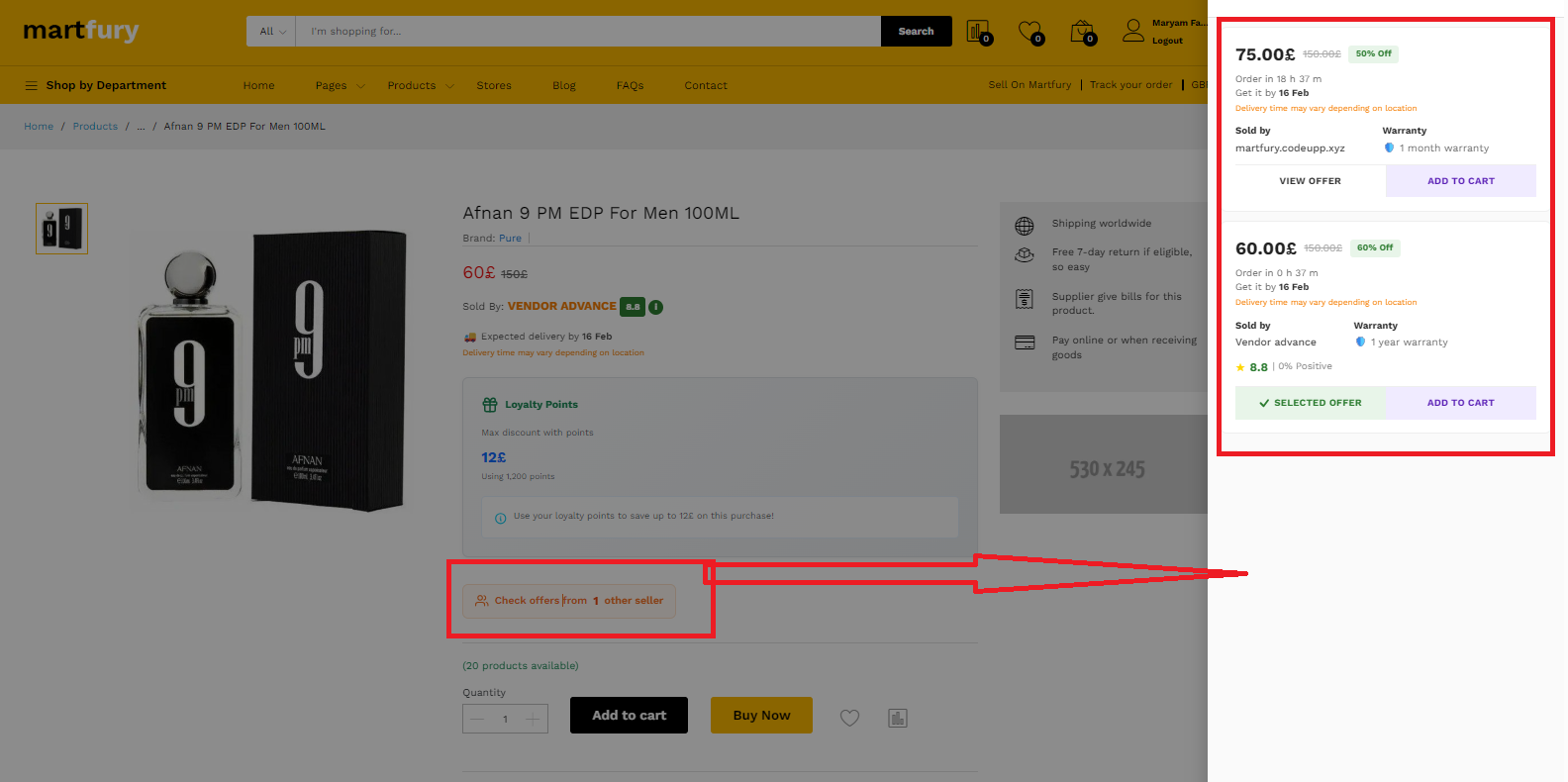
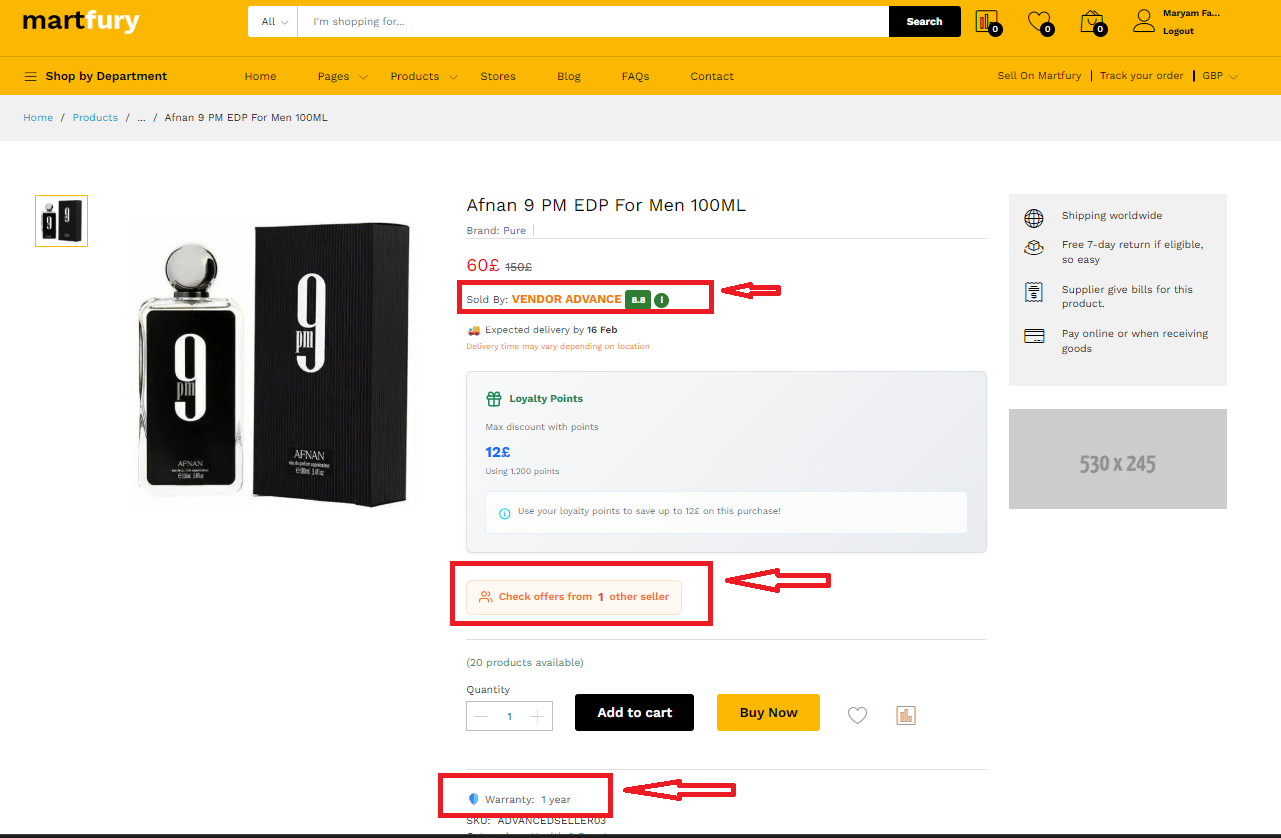
### 1. Multi-Seller Offers Panel — "The Amazon Buy Box"
When a customer views any product, they see:
>**"Check offers from 3 other sellers"**
Clicking opens a sleek right-side sliding panel showing **every seller** offering that product:
-**Price** with original price strikethrough and **discount % badge**
-**Delivery estimate** (dynamic: "Order in X h Y m — Get it by 15 Feb")
-**Seller name** with link to their store
-**Seller Score** (color-coded: green ≥ 7, orange 4-7, red < 4)
-**Positive review percentage**
-**Warranty info**
-**"SELECTED OFFER"** badge on the product you're currently viewing
-**"VIEW OFFER"** button opens that specific vendor's product page
-**"ADD TO CART"** button adds directly from the panel
**This single feature can increase your marketplace sales by 30%+** — because customers see competitive prices and buy with confidence.
---
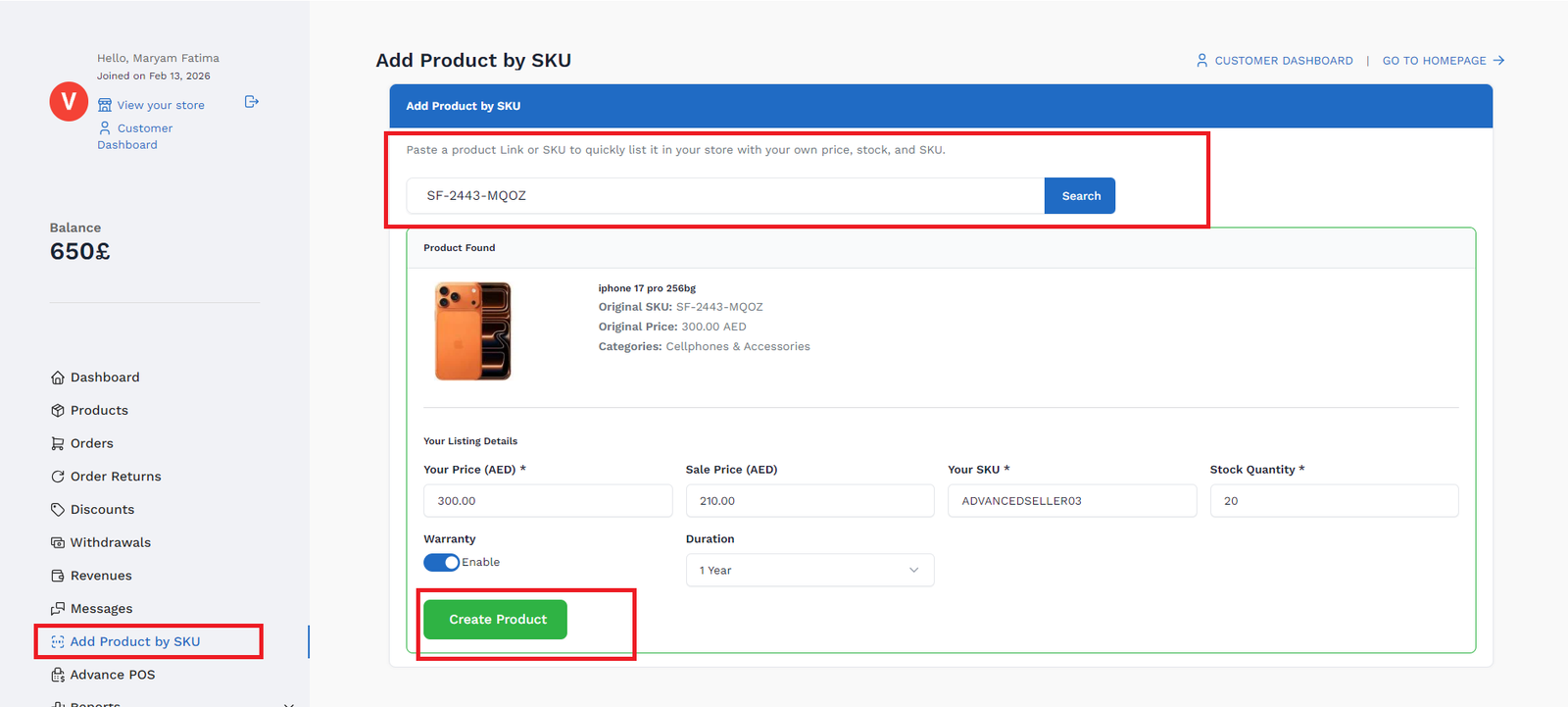
### 2. Add Product by SKU or URL — "List in 10 Seconds"
Vendors don't need to create products from scratch. They simply:
1.**Paste a product URL or SKU** into the search box
2. System **instantly finds the product** and shows a full preview (image, name, price, categories, description)
3. Vendor sets their own **Price, Sale Price, SKU, and Stock Quantity**
4. Click **"Create Product"** — done!
**What gets copied automatically:**
- All product images
- Full description
- Categories & tags
- Product attributes
- A unique barcode is auto-generated (`MS-2026-XXXXX` format)
- A unique slug is created for the vendor's product page
**Smart features:**
- Accepts both **product URLs** and **raw SKU codes**
- Extracts SKU from URLs like `https://yoursite.com/products/gaming-keyboard-SKU-SELLER01`
-**Prevents vendors from copying their own products**
-**Traces to the root inhouse product** even when copying from another vendor
- Product goes through **admin approval workflow** (if enabled)
---
### 3. Vendor Reports Dashboard — "Know Everything"
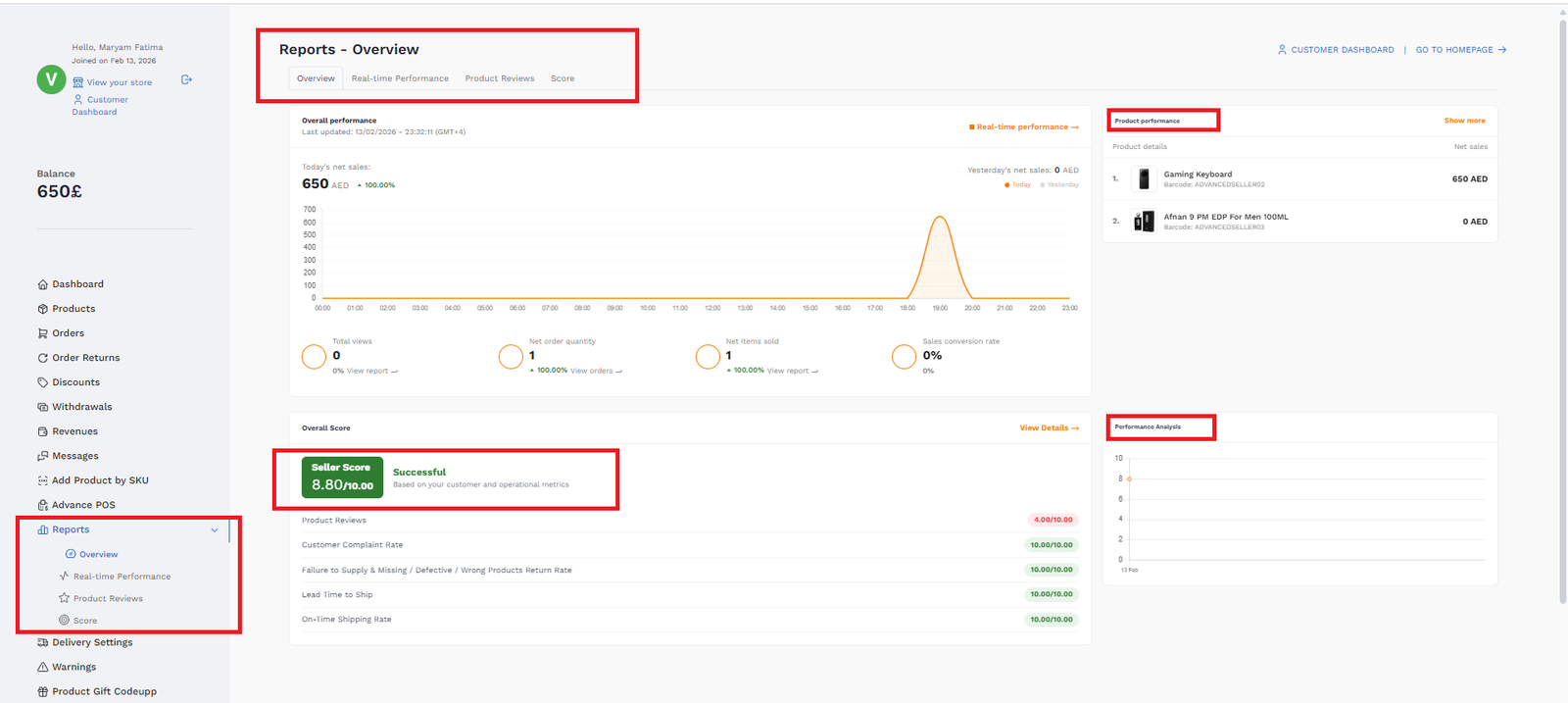
Four powerful tabs give vendors complete visibility into their business:
---
#### Tab 1: Overview
The command center. At a glance, vendors see:
-**Today's net sales** vs **Yesterday's net sales** with % change arrows
-**Interactive hourly sales graph** — hover/touch to see exact sales at any hour, with Today (orange) vs Yesterday (grey dashed) comparison
-**4 stat cards** with beautiful white-circle icons:
-**Total Views** — how many customers viewed their products today
-**Net Order Quantity** — orders received today
-**Net Items Sold** — total items shipped
-**Sales Conversion Rate** — views-to-orders percentage
-**Product Performance sidebar** — top 5 products by sales with image, barcode, and revenue
-**Overall Score summary** — score badge, status label, and metric breakdown
-**Performance Analysis chart** — score trend over the last 8 weeks
---
#### Tab 2: Real-time Performance
Deep-dive analytics with:
-**5 summary cards:** Total Views, Seller Views, Added to Cart, Gross Orders, Conversion Rate — each with % change vs previous period
-**Daily sales bar chart** with hover tooltips showing exact amounts
-**Conversion rate sparkline**
-**Detailed product table** with columns:
- Product name + image + model code (click to copy)
- Total Views | Gross Favorites | Active Favorites | Seller Views
- Added to Cart | Gross Order Quantity | Sales Conversion Rate
-**Auto-refreshes every 60 seconds** — truly real-time
---
#### Tab 3: Product Reviews
All customer reviews for the vendor's products in one place:
-**Product name & image**
-**Customer name**
-**Star rating** — color-coded (green ≥ 4 stars, orange = 3, red < 3)
-**Review comment**
-**Date**
- Paginated for easy browsing
---
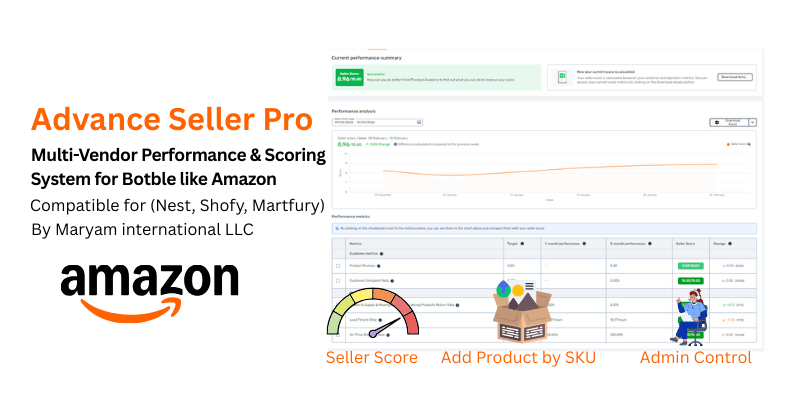
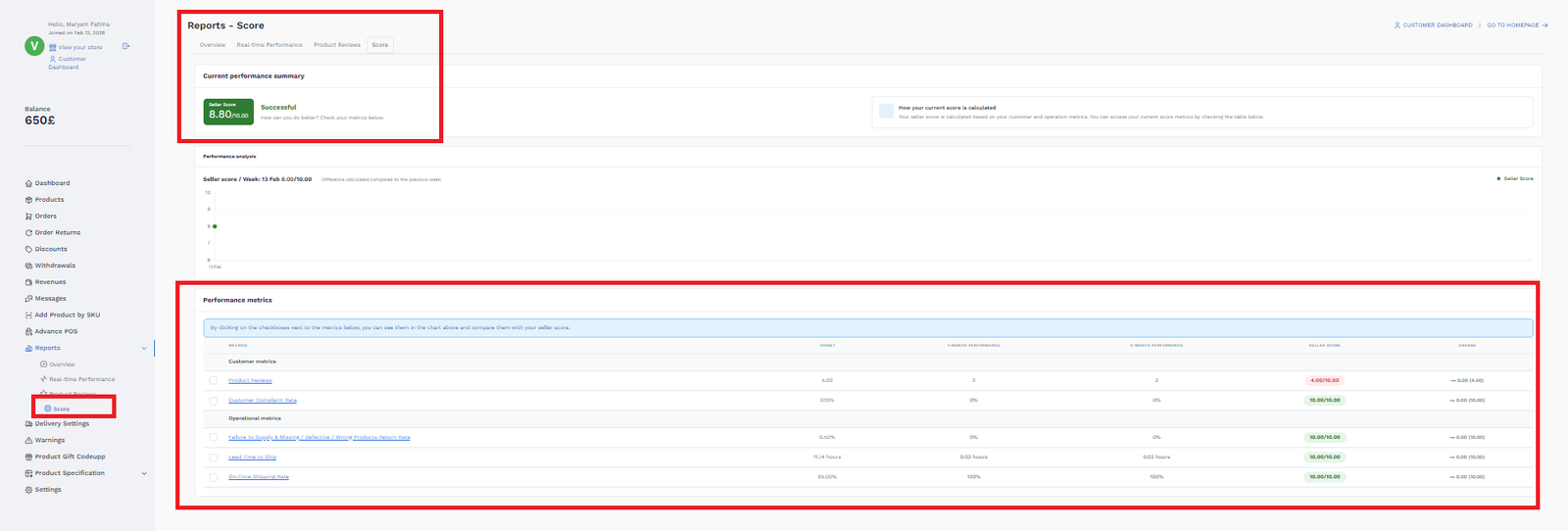
#### Tab 4: Score — "Your Seller Report Card"
The heart of the scoring system:
-**Overall Seller Score badge** — X.XX / 10.00 with status:
-**Successful** (green, ≥ 8.5)
-**Good** (orange, 7.0 - 8.49)
-**Needs Improvement** (red, < 7.0)
-**Score history line chart** — track your progress week by week
-**Detailed metrics table:**
| Metric | Group | What It Measures |
|--------|-------|------------------|
| Product Reviews | Customer | Average star rating from customers |
| Customer Complaint Rate | Customer | % of orders that were canceled/refunded |
| Failure to Supply Rate | Operational | % of **vendor-initiated** cancellations only (admin cancels have no effect) |
| Lead Time to Ship | Operational | Average hours from order received → picked/delivered (Amazon/Trendyol style, uses `ec_shipments`) |
| On-Time Shipping Rate | Operational | % of orders fulfilled within 1.5× vendor's handling time promise |
Each metric shows: **Target value, 1-month performance, 3-month performance, Score, and Change vs previous period.**
---
### 4. Vendor Warnings System
- Vendors receive warnings from admin with **subject + detailed message**
-**Unread badge count** in the sidebar
-**Mark as read** functionality
- Full warning history with dates
---
### 5. Admin Panel — "Total Control"
---
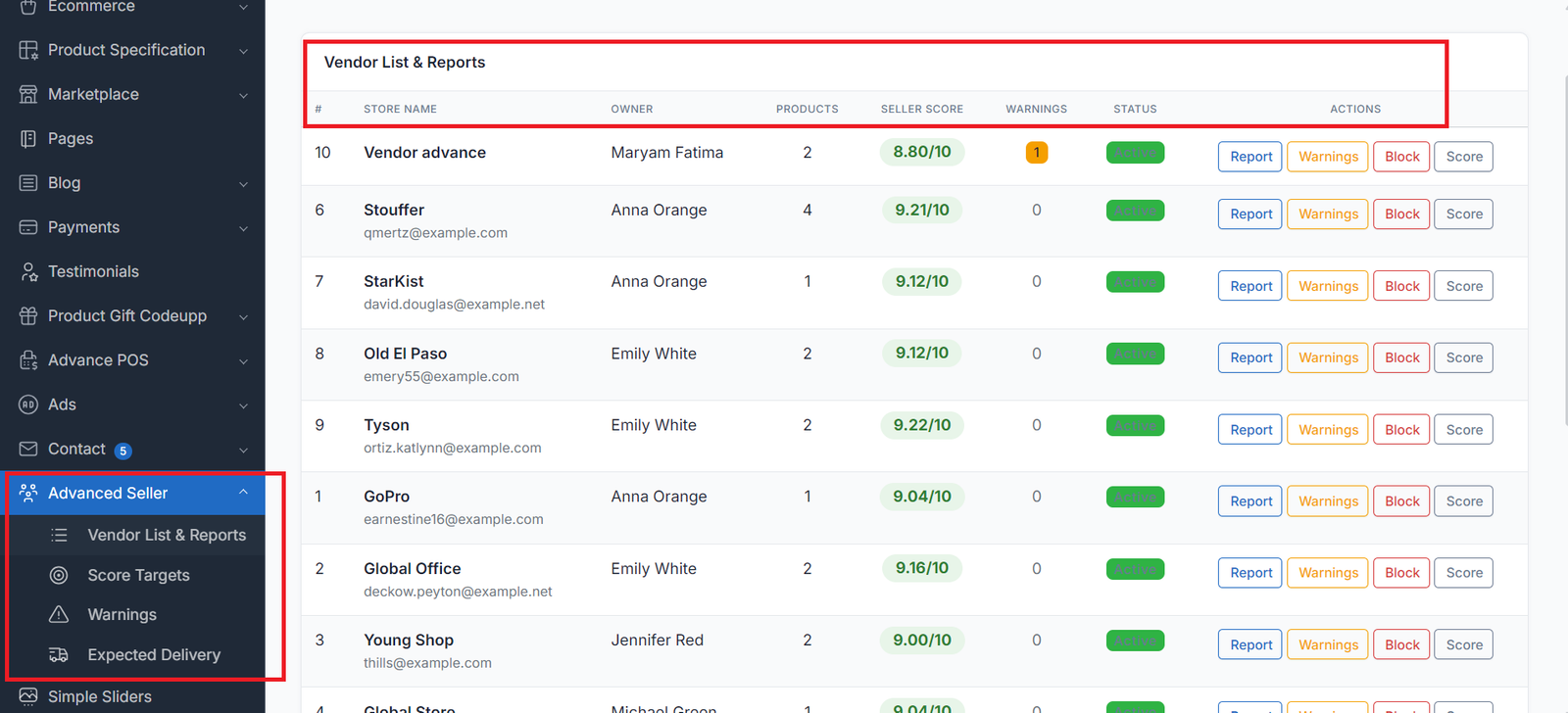
#### Vendor List & Reports
A complete overview of every vendor in your marketplace:
-**Store Name** with email
-**Owner name**
-**Product count**
-**Live Seller Score** — dynamically calculated, color-coded badge (green/red)
-**Warning count** — with badge
-**Status** — Active or Blocked
-**Action buttons** with clear labels:
-**Report** — view detailed vendor analytics
-**Warnings** — view vendor's warning history
-**Block / Unblock** — instantly hide or restore a seller's products
-**Score** — manually adjust the vendor's score (+/- points)
**Manual Score Adjustment:**
Click the "Score" button on any vendor to reveal an inline form. Enter a value from **-10 to +10** — this gets added to the dynamic calculation. Perfect for:
- Rewarding exceptional sellers (+1, +2)
- Penalizing sellers after manual complaints (-1, -2)
- The final score is always: **Dynamic Calculation + Admin Adjustment**, clamped to 0-10
---
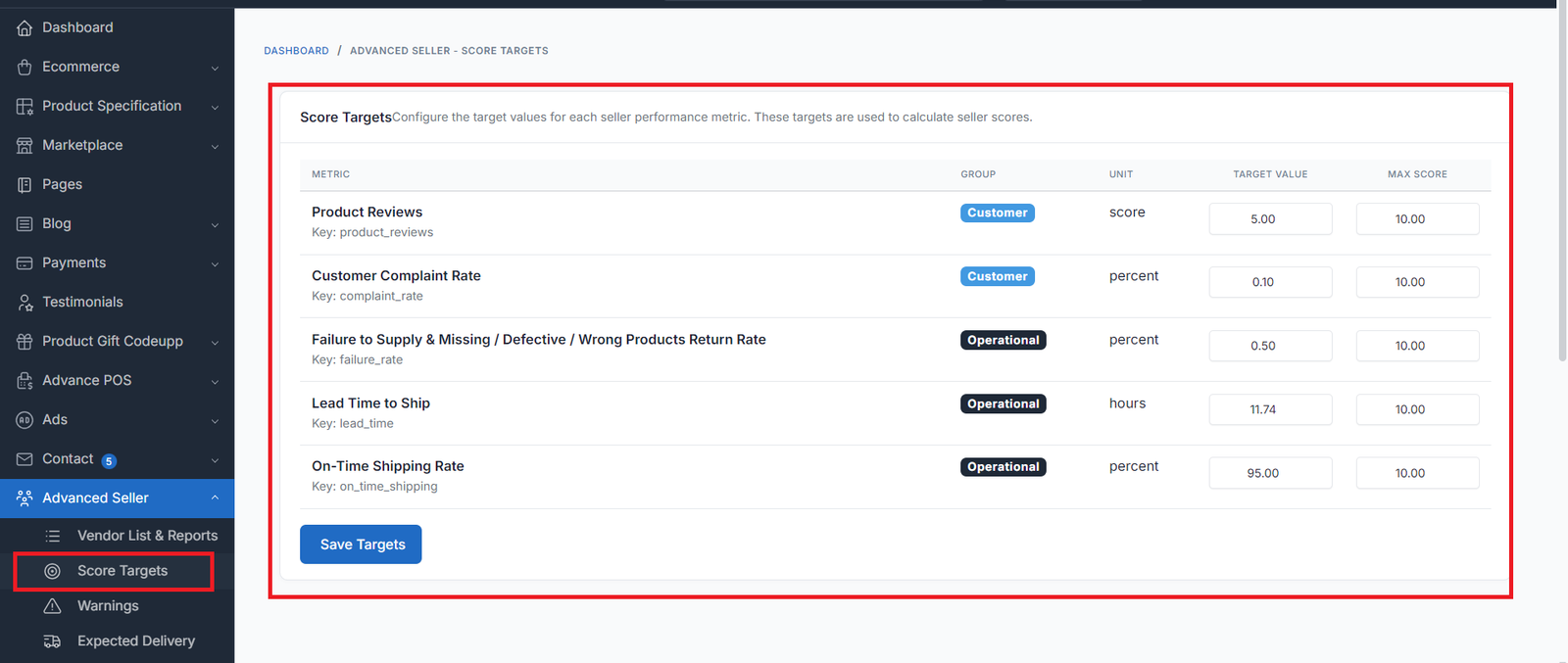
#### Score Targets Configuration
Admin controls what "good" looks like:
-**Product Reviews** — target average star rating (default: 5.00)
-**Customer Complaint Rate** — target max % (default: 0.10%)
-**Failure to Supply Rate** — target max % (default: 0.50%)
-**Lead Time to Ship** — target max hours (default: 11.74 hours)
-**On-Time Shipping Rate** — target min % (default: 95.00%)
Each metric has a **configurable max score weight** (default: 10 each). Adjust these to prioritize what matters most for your marketplace.
Group badges are clearly visible with **bold white text** on colored backgrounds.
---
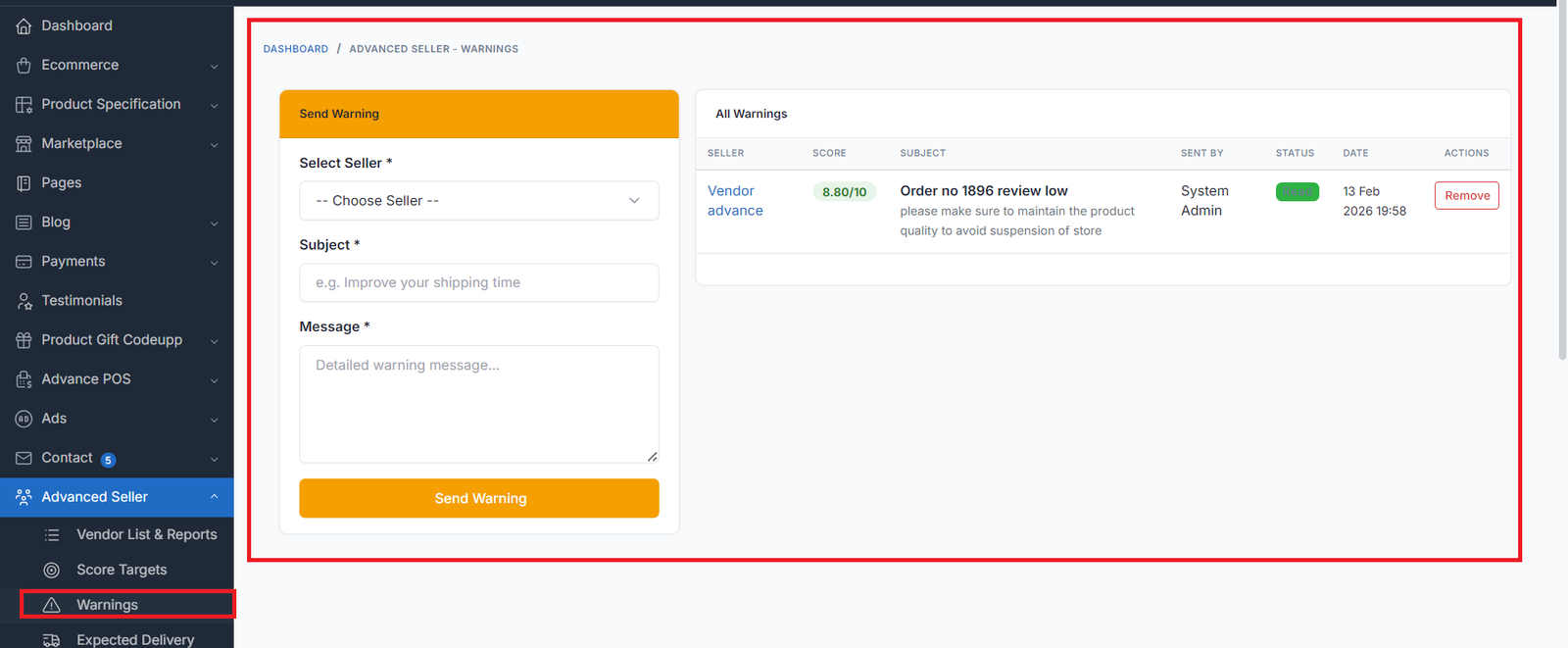
#### Warnings Management
Full warning control:
-**Send warnings** to any vendor — select from dropdown showing **store name, owner, and current score**
-**View all warnings** across the marketplace with:
- Seller name (linked to their report)
-**Live seller score** with color badge
- Subject + message preview
- Sent by (admin name)
- Read/Unread status
- Date
-**Remove button** — delete any warning permanently
-**Per-vendor warning history** — click any vendor to see only their warnings
---
#### Block/Unblock Sellers
One-click seller management:
-**Block** — seller's products are hidden from the storefront instantly
-**Unblock** — products are restored
- Confirmation dialog prevents accidental clicks
---
### 6. Handling Time System — "Amazon/Trendyol-Style Fulfillment Tracking"
The Handling Time system measures how fast vendors process and ship orders — the core metric used by Amazon, Trendyol, and Noon to rank sellers.
---
#### Vendor: Set Handling Time
**Vendor Dashboard → Delivery Settings → Handling Time:**
- Set **handling time** in days (1-7 days)
- This is the vendor's **promise** — how many days they need to process an order and hand it to the carrier
- Example: `1` = must mark order as Picked within 1 day, `2` = within 2 days
---
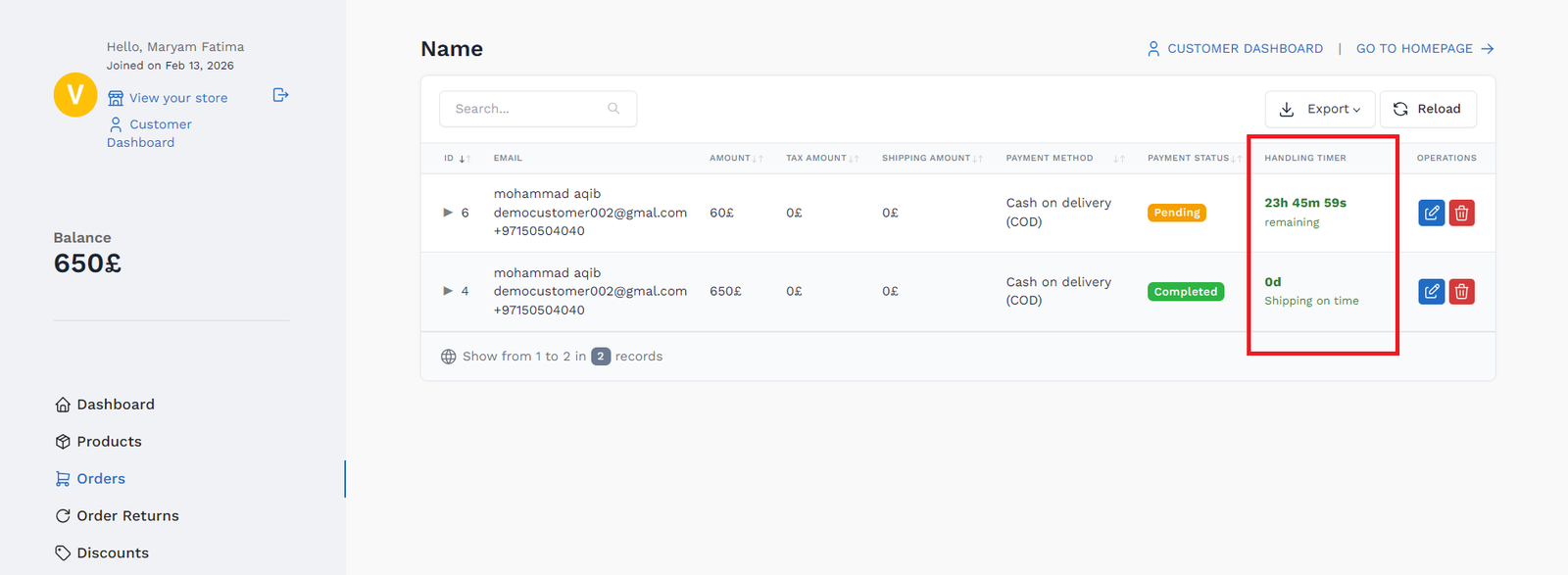
#### Vendor: Handling Timer on Orders
In the **vendor orders list**, a new **"Handling Timer"** column appears next to each order with a **real-time countdown** that updates every second:
| Timer State | Display | Meaning |
|-------------|---------|--------|
| **Green countdown** | `1d 18h 30m 45s` + "remaining" | On track — live countdown ticking every second |
| **Red OVERDUE** | `OVERDUE` + `0d 3h 15m 22s overdue` | Past deadline — live count-up showing how late |
| **Green static** | `0.8d` + "Picked on time" | Fulfilled within handling time |
| **Orange static** | `1.3d` + "Picked slightly late" | Fulfilled within 1.5× handling time |
| **Red static** | `2.1d` + "Picked exceeded limit" | Fulfilled too late — score penalized |
| **Red static** | `Vendor canceled` + "Penalizes score" | Vendor canceled the order |
| **Gray static** | `Admin canceled` + "No score effect" | Admin canceled — no score effect |
**Key features:**
-**Real-time countdown**: Days, Hours, Minutes, Seconds — updates every second via JavaScript
-**Green bold** text while time remains, **red bold** when overdue
- Countdown auto-restarts on DataTable page changes and AJAX reloads
- Handles **admin direct delivery** (status changed directly to Delivered without Picked) — time is still calculated and scored
---
#### Admin: Sellers Handling Time Overview
**Admin → Advanced Seller → Sellers Handling Time:**
A full-page table showing every vendor's handling performance over the last 90 days:
| Column | Description |
|--------|------------|
| **Seller** | Store name + owner name (linked to vendor report) |
| **Handling Time** | Vendor's promised handling time (e.g. "1 day") |
| **Total Orders** | Total orders in the last 90 days |
| **On Time** | Orders picked within handling time (green) |
| **Slightly Late** | Orders picked within 1.5× handling time (orange) |
| **Overdue** | Orders picked beyond 1.5× handling time (red) |
| **Pending** | Orders not yet fulfilled |
| **Vendor Canceled** | Orders canceled by vendor (red if > 0) |
| **Avg Pick Time** | Average time to fulfill orders (color-coded) |
| **On-Time Rate** | % of orders fulfilled on time (color-coded) |
| **Status** | ✅ Good (≥90%), ⚠️ Warning (70-89%), ❌ Bad (<70%) |
---
#### Scoring Logic — Monthly Reset, Volume-Aware, Gradual Penalties
The scoring system is designed like **Amazon and Trendyol** — fair to new/small sellers, aggressive only for high-volume repeat offenders.
**Score resets monthly:** Only the last **30 days** of data are used for score calculation. Each month is a fresh start — vendors can recover quickly by improving. The 3-month column is displayed for reference/trend only.
---
##### Volume-Aware Penalty Tiers (per month)
Low-volume sellers get **leniency** — a single mistake shouldn't destroy their score:
| Monthly Orders | Penalty Applied | Min Score Floor | Example |
|---|---|---|---|
| **< 5 orders** | Only 15% of penalty | 8.5/10 minimum | 1 cancel out of 2 orders → barely drops |
| **5-10 orders** | Only 35% of penalty | 6.5/10 minimum | 2 cancels out of 8 → moderate drop |
| **10-20 orders** | Only 60% of penalty | 4.0/10 minimum | 5 cancels out of 15 → noticeable drop |
| **20+ orders** | Full (aggressive) penalty | No floor | High volume = full accountability |
---
##### Logarithmic Penalty Curve
Instead of linear degradation (which is too harsh), penalties follow a **logarithmic curve**:
- Going from 0.5% → 5% failure rate = **mild penalty**
- Going from 5% → 20% failure rate = **moderate penalty**
- Going from 20% → 50% failure rate = **steep penalty**
This gives vendors time to notice and fix issues before scores tank.
**Max penalty cap:** No single metric can lose more than **60%** of its points in one month.
---
##### Metric Details
**Lead Time to Ship:**
- Measures average hours from **order received → order fulfilled** (picked/delivering/delivered)
- Uses `ec_shipments` table for accurate timestamps
- If admin marks delivered directly (skipping picked), the time is still calculated
- Admin-canceled orders are excluded (no penalty)
- Logarithmic penalty curve for small overages
**On-Time Shipping Rate:**
- Measures % of orders fulfilled within **1.5× vendor's handling time**
- Example: If handling time = 1 day (24h), max allowed = 36h
- Admin-canceled orders are excluded
- Score floor at 40% — even poor performance retains some score
**Failure to Supply Rate:**
- Only counts **vendor-initiated cancellations** (not admin cancellations)
- Determined by checking `ec_order_histories` — vendor cancels have `user_id = 0`, admin cancels have `user_id > 0`
- Volume-aware: 1 cancel out of 2 orders (< 5 monthly) → barely affects score
**Customer Complaint Rate:**
- Counts canceled/refunded orders as complaints
- Same volume-aware penalty tiers and logarithmic curve as failure rate
**No-data sellers** (new vendors with no orders) receive **full marks** — benefit of the doubt.
---
#### Admin: Set Handling Time for Inhouse Products
**Admin → Advanced Seller → Expected Delivery → Handling Time:**
- Set handling time for admin/inhouse products (1-7 days)
- Same scoring logic applies to admin's own orders
---
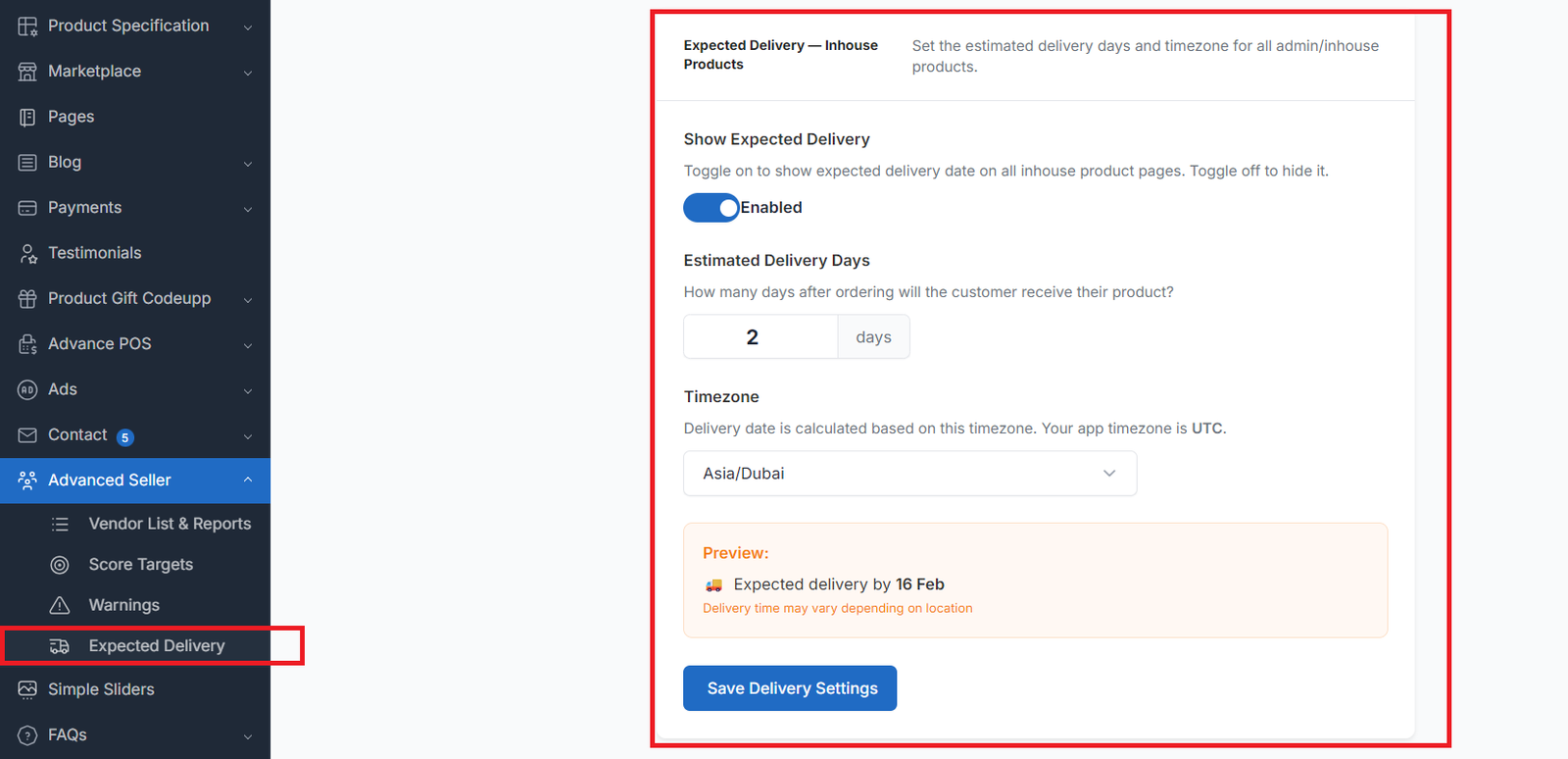
### 7. Expected Delivery System — "Dynamic & Per-Seller"
Both admin and vendors can configure delivery settings from their dashboards:
**Admin Dashboard → Advanced Seller → Expected Delivery:**
- Set **estimated delivery days** for all inhouse products (1-30 days)
- Select **timezone** — all timezones listed, current app timezone highlighted as default
-**Toggle on/off** — disable to hide delivery info from all inhouse product pages
**Vendor Dashboard → Delivery Settings:**
- Set **estimated delivery days** for their products
- Select **timezone** — independent per vendor
-**Toggle on/off** — each vendor controls their own delivery visibility
**How delivery date is calculated:**
- Uses the seller's configured timezone (not server default)
-**10 PM cutoff:** orders placed after 10 PM count from the next day
- Example: Dubai timezone, 2 AM on Feb 14, 2 delivery days → shows **"Expected delivery by 16 Feb"**
- Example: Dubai timezone, 11 PM on Feb 14, 2 delivery days → shows **"Expected delivery by 17 Feb"**
**Where it appears:**
- Product detail page (below "Sold By" line)
- Check Offers panel (per seller, dynamically)
- Orange disclaimer: *"Delivery time may vary depending on location"*
**Per-seller dynamic:** If Vendor A has delivery ON and Vendor B has delivery OFF, only Vendor A's products show delivery info — both on product pages and in the offers panel.
---
### 8. Warranty System — "Per-Product, Per-Seller"
**On product create/edit page (admin & vendor):**
-**Warranty toggle** (Yes/No) — appears below barcode field
-**Duration dropdown** — 1 month, 2 months, 6 months, 1 year, 2 years, ... up to 10 years
- If "No" is selected, warranty section is hidden in the offers panel
**In Add Product by SKU:**
- Warranty toggle + duration dropdown included in the listing form
- Vendor sets their own warranty when copying a product
**In Check Offers panel:**
- Each seller's warranty is shown dynamically per offer
- If a seller has no warranty set, the warranty column is hidden for that offer
- No more hardcoded "1 year warranty" — everything is dynamic
---
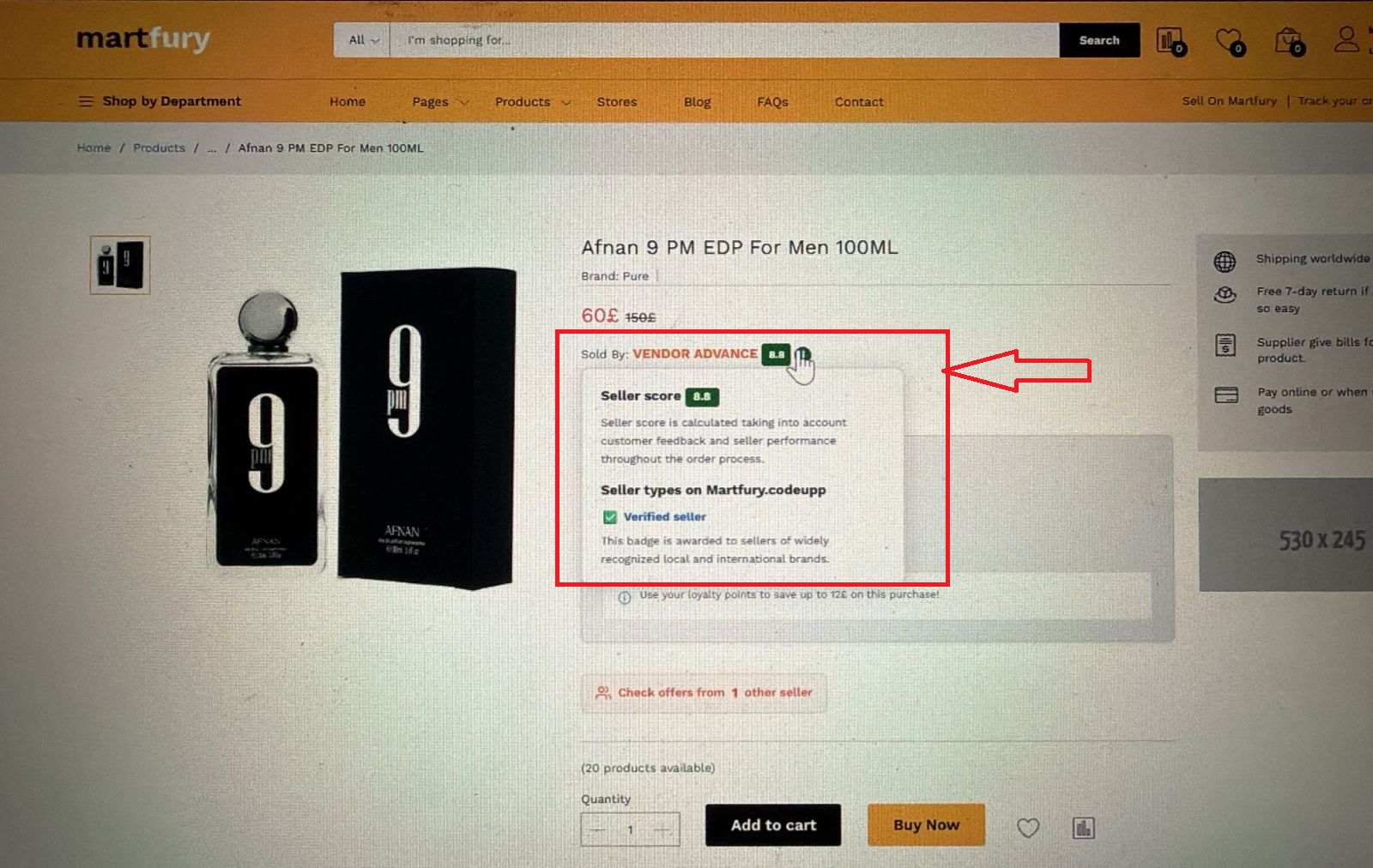
### 9. Seller Score Info Tooltip — "Transparency Builds Trust"
Next to the seller score on the product detail page, a small **ⓘ** icon appears. On hover (desktop) or touch (mobile), a popup shows:
-**Seller score** — dynamic number with colored badge (green ≥ 6, red < 6)
-**Description:** *"Seller score is calculated taking into account customer feedback and seller performance throughout the order process."*
-**"Seller types on [Your Website Name]"** — dynamic, uses your site's domain name
-**✅ Verified seller** badge with description: *"This badge is awarded to sellers of widely recognized local and international brands."*
The popup auto-closes when the mouse leaves (desktop) or when tapped again (mobile).
---
### 10. SKU on Product Cards — "Copy & List"
Every product card on your storefront shows the **SKU** with a **click-to-copy** button. This makes it effortless for vendors to:
1. Browse the marketplace
2. See a product they want to sell
3. Click the SKU to copy it
4. Go to "Add Product by SKU" and paste
Works on **all product cards** including homepage, category pages, search results, flash sales, and AJAX-loaded content.
---
### 11. Automatic View & Cart Tracking
Every customer interaction is tracked automatically:
-**Product page views** — tracked per product, per vendor, deduplicated by session (1 view per hour per visitor)
-**Add to cart events** — tracked when customers click any add-to-cart button
-**Wishlist/favorite events** — tracked with active/inactive status
- Works seamlessly with **Martfury theme** (detects `#hidden-product-id` input)
- No manual setup required — just activate the plugin
---
### 12. Auto Cache Clear on Activate/Deactivate
Perfect for **shared hosting** where you can't run CLI commands:
When you activate or deactivate the plugin from the admin panel, it automatically runs:
-`cache:clear`
-`view:clear`
-`route:clear`
-`config:clear`
No SSH access needed. Just upload files and toggle the plugin.
---
## Database Tables
| Table / Column | Purpose |
|-------|---------|
| `as_seller_product_views` | Track product page views per seller |
| `as_seller_warnings` | Admin warnings to sellers |
| `as_score_targets` | Configurable score metric targets |
| `as_seller_scores` | Calculated seller scores history (daily snapshots) |
| `as_cart_tracking` | Track add-to-cart events per seller product |
| `as_favorite_tracking` | Track wishlist/favorite events |
| `ec_products.source_product_id` | Links vendor copy to root inhouse product |
| `ec_products.warranty_enabled` | Per-product warranty toggle (boolean) |
| `ec_products.warranty_duration` | Warranty duration string (e.g. "1 year", "6 months") |
| `mp_stores.is_blocked` | Seller block status |
| `mp_stores.manual_score_adjustment` | Admin manual score +/- adjustment |
| `mp_stores.delivery_days` | Vendor estimated delivery days |
| `mp_stores.delivery_timezone` | Vendor delivery timezone |
| `mp_stores.delivery_enabled` | Vendor delivery toggle on/off |
| `mp_stores.handling_time` | Vendor handling time promise in days (default: 1) |
| `as_product_documents` | Document request/submission records between admin and vendors |
| `ec_products.document_requested` | Flag indicating a document has been requested for this product |
---
## Installation
1. Copy the `AdvancedSeller` folder to `platform/plugins/`
2. Go to **Admin → Plugins → Activate "Advanced Seller"**
3. Run migrations: `php artisan migrate`
4. Cache is cleared automatically on activation!
>**Shared hosting?** Just upload the files, activate the plugin from admin panel — migrations run automatically and cache is cleared. No terminal needed.
---
## Admin Sidebar Menu
-**Advanced Seller**
- Vendor List & Reports
- Score Targets
- Warnings
- Expected Delivery
-**Sellers Handling Time** ← NEW
## Vendor Sidebar Menu
-**Add Product by SKU**
-**Reports**
- Overview
- Real-time Performance
- Product Reviews
- Score
-**Delivery Settings** (includes Handling Time)
-**Warnings**
> The standalone "Reviews" menu item from the default marketplace plugin is automatically hidden — reviews are already integrated under Reports.
---
## Compatibility
-**Botble CMS** 7.3+
-**Themes:** Martfury, Shofy (and any Botble-compatible theme)
-**PHP:** 8.1+
-**Hosting:** Works on shared hosting, VPS, and dedicated servers
-**Marketplace Plugin:** Required (comes with Botble)
-**Ecommerce Plugin:** Required (comes with Botble)
---
## What Makes This Different?
| Feature | Other Plugins | Advanced Seller |
|---------|--------------|-----------------|
| Multi-seller offers panel | No | Yes — Amazon-style |
| Vendor scoring system | No | Yes — 5 metrics + manual adjust |
| Real-time analytics | No | Yes — hourly graphs, per-product tables |
| Add product by URL | No | Yes — paste link or SKU |
| Admin manual score control | No | Yes — +/- adjustment per vendor |
| View & cart tracking | No | Yes — automatic, deduplicated |
| Warning system | No | Yes — with read/unread + delete |
| Works on shared hosting | Sometimes | Always — auto cache clear |
---
## Changelog
>**Full changelog with beautiful UI is also available in:** Admin Panel → Advanced Seller → Changelog
### v1.0.3 — July 25, 2026
**Bug Fixes:**
-**Currency Conversion Fix** — Fixed an issue where the "Check offers from other seller" panel displayed the selected currency symbol without properly scaling the numeric value by the exchange rate. It now uses Botble's native `ProductPrice` engine.
### v1.0.2 — February 17, 2026
**New Features:**
-**Product Document Request** — Admin can request invoices or certificates from vendors directly from the product edit page. Select "Request Document" from the Status dropdown or click the dedicated button in the sidebar
-**Document History** — Full history of all document requests and submissions per product. Admin can view, download, and re-request documents at any time
-**Re-Request Documents** — Admin can request documents multiple times (e.g., after customer complaints about fake products). Each request creates a new record preserving full audit trail
-**Vendor Document Submission** — Vendors see a pulsing "Required Document" button on their product list when a document is requested. Submit via popup with comments and file upload (PDF, JPEG, PNG up to 10MB)
**Improvements:**
-**Dynamic Currency** — Vendor reports (Overview, Add by SKU) now use the application's configured currency symbol instead of hardcoded values
-**Performance Optimization** — Reduced database queries and improved page load speed across vendor dashboard and admin panels
-**Admin Sold By Display** — Admin/inhouse products now correctly show "Sold By: [Website Name]" on the product detail page
**Bug Fixes:**
-**Admin & Seller Price Separation** — Fixed issue where admin and seller product prices could overlap or display incorrectly on the storefront
-**Stability Improvements** — Resolved edge cases in form rendering, data validation, and plugin activation on shared hosting environments
### v1.0.1 — February 15, 2026
**New Features:**
-**Smooth Area Chart** — Real-time Performance tab now uses ApexCharts smooth area chart matching the vendor dashboard Sales Reports style
-**Smart Product Listing** — Copied products no longer appear as separate listings on homepage; they only show inside the "Check offers" panel
-**Lowest Price First** — Homepage now displays the lowest available price across all sellers (Amazon-style), offers sorted by price ascending
-**Cron Job Admin Page** — New admin panel page with dynamic cron commands, copy buttons, hosting guides, and one-click "Run Now" button
-**Run Cron from Admin** — Score snapshots can now be triggered directly from the admin panel without SSH or cron setup
-**Changelog Page** — Beautiful versioned changelog accessible from admin panel
**Improvements:**
-**Score Tab Cleanup** — Removed unnecessary checkboxes from Performance Metrics table for cleaner UI
-**Offers Panel Close Button** — Added prominent black close button for desktop and sticky bottom close bar for mobile
-**Offers Sorting** — Offers now sorted by effective price (sale price or regular price) ascending, lowest first
**Bug Fixes:**
-**Score Calculation Fix** — Fixed issue where seller score could get stuck and not update dynamically
-**Snapshot Caching Fix** — Daily score snapshots now use updateOrCreate instead of skipping existing records
-**Consistent Query Counting** — Fixed complaint_rate and failure_rate queries to use consistent is_finished filtering
### v1.0.0 — February 2026
**Initial Release — Full Multi-Vendor Performance Engine:**
- Add Product by SKU — vendors copy and list existing products with custom pricing
- Multi-Seller Offers Panel — side panel showing all sellers with price comparison
- Seller Scoring System — volume-aware, monthly, logarithmic penalties (Amazon/Trendyol style)
- Vendor Reports Dashboard — Overview, Real-time Performance, Product Reviews, Score tabs
- Product View Tracking — total views, seller views, favorites, cart additions per product
- Handling Timer — real-time countdown on vendor orders with color-coded status
- Admin Warnings System — send warnings to vendors, auto-block after threshold
- Delivery Settings — per-vendor delivery days, timezone, 10 PM cutoff logic
- Warranty System — per-product warranty toggle with duration on offers panel
- Custom Sold By — enhanced section with seller score badge, delivery estimate, warranty
- SKU in URL — product URLs include SKU suffix for SEO
- Admin Score Targets — configurable metric targets and weights
- Score History Graph — line chart showing seller score trends over time
- Daily Score Snapshots — artisan command for automated daily score recording
---
## Cron Job Setup (Required for Score History)
The plugin includes a scheduled command that takes daily score snapshots for all sellers. This powers the score history graph.
**Option 1 — Run from Admin Panel (Easiest):**
Go to **Admin Panel → Advanced Seller → Cron Job** and click the **"Run Now"** button. No terminal needed.
**Option 2 — Add cron entry to your server:**
```
* * * * * cd /path-to-your-project && php artisan schedule:run >> /dev/null 2>&1
```
The plugin automatically registers its `seller-score:snapshot` command to run daily at **00:05 AM**.
**Option 3 — Run manually via SSH:**
```bash
phpartisanseller-score:snapshot
```
>**Note:** The live score on the vendor dashboard is always real-time (fresh DB queries). The cron is only needed for the **score history graph** — it saves one snapshot per day per store.
---
## Coming Soon
- Excel/CSV export for all reports
- Email & SMS notifications for warnings
- Seller badge system (Gold, Silver, Bronze) based on score tiers
- Vendor comparison dashboard for admin
- Customer-facing seller badges on product cards
---
## Support
For support, customization, or feature requests:
-**Website:** [www.codeupp.xyz](https://www.codeupp.xyz)
-**Email:** support@codeupp.xyz
---
>**Stop running a marketplace. Start running a platform.**
> Advanced Seller gives you the tools that Amazon, Trendyol, and Noon spent millions building — ready to use in your Botble marketplace today.
---
*Developed with precision by [Maryam International LLC](https://www.codeupp.xyz) — Powering marketplaces worldwide.*
Have doubt? Contact us on WhatsApp
Our product is high quality. Contact us for any kind of custom work.
Last update:
Jul 25, 2026 12:33 AM
Published:
Apr 26, 2026 01:34 AM
Version:
v1.0.3
Category:
Tags: