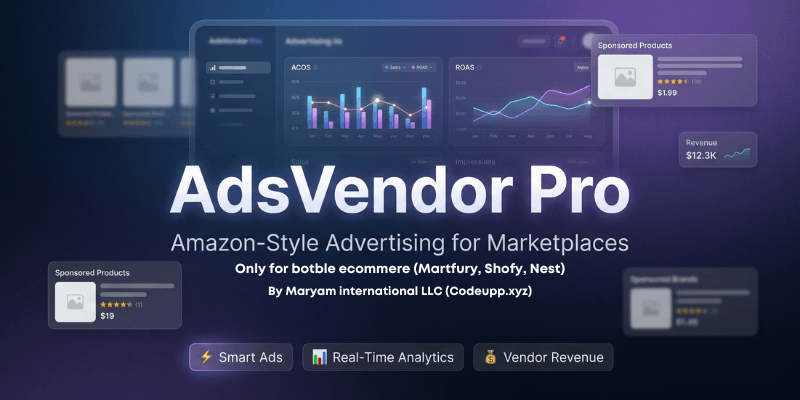
AdsVendor Pro — Amazon-Style Advertising Engine for Botble MarketplaceThe Most Powerful Vendor Advertising Plugin for Botble CMS
By Codeupp — Maryam International LLC
Turn your marketplace into a revenue machine. Give vendors the power to promote their products with a world-class, Amazon-inspired advertising system — complete with smart bidding, real-time analytics, banner ads, and an intelligent algorithm that maximizes ROI for both vendors and marketplace owners.
Why AdsVendor Pro?
Most marketplaces leave money on the table. Amazon generates $47 billion/year from advertising alone. With AdsVendor Pro, you bring that same proven model to your Botble marketplace:
- New Revenue Stream — Vendors pay to promote products. You earn from every view and click.
- Zero Extra Work — The algorithm handles ad placement, billing, and budget management automatically.
- Premium Experience — Beautifully designed ad sections that blend seamlessly with any Botble theme.
- Complete Control — Set your own rates, approve every ad, decide exactly where it appears.
- Vendor Self-Service — Vendors manage their own campaigns, wallet, reports — just like Amazon Seller Central.
Key FeaturesAmazon-Style Smart Advertising Engine
FeatureDescription
Dynamic CPM Pricing
Auto-adjusts based on demand, competition & peak hours — just like Amazon's auction system
Manual Rate Control
Admin can switch to manual mode and set exact cost-per-view and cost-per-click rates
Quality Score Algorithm
Ads ranked by bid × quality score × relevance — high-quality ads get premium placement
Smart Targeting
Shows relevant ads based on customer purchase history and browsing behavior
Click Fraud Prevention
Same IP blocked from generating duplicate clicks within 5 minutes
View Deduplication
Same IP can't generate duplicate views within 1 hour
Peak-Hour Pricing
CPM increases during high-traffic hours (9am-2pm, 6pm-9pm) for higher revenue
Budget Auto-Completion
Ads automatically pause when budget is exhausted
IntersectionObserver Tracking
Views counted only when the ad is actually visible on screen — no fake impressions
Vendor Dashboard (Self-Service)
- Create Product Ads — Select product, set budget & duration, submit for approval
- Create Banner Ads — Upload banner image, choose slot, book dates with availability calendar
- Ad Wallet — Dedicated advertising wallet with top-up via any payment method (Stripe, PayPal, bank transfer, etc.)
- Real-Time Reports — Per-ad analytics: views, clicks, CTR, cost breakdown by day, chart visualizations
- Campaign Management — View all ads, check status, see placement info
- Signup Bonus — New vendors receive configurable welcome credits to start advertising immediately
Admin Control Center
- Full Dashboard — Revenue overview, active ads count, total views, wallet balances, CPM trends
- Ad Approval Workflow — Review every ad before it goes live. Set placement (Homepage Section 1, Section 2, or Product Detail Page)
- Banner Ad Approval — Review banners, set display page (Homepage, Product Detail, Category, or All Pages), assign slot (1-8)
- Billing Mode Toggle — Switch between Auto (dynamic) and Manual (fixed rates) with one click
- Manual Rate Setting — Set exact cost-per-view and cost-per-click when you want full control over burn rates
- Wallet Management — View all vendor wallets, manually credit/debit balances
- Transaction Audit Trail — Every wallet transaction logged with type, amount, and reference
- Customizable UI — Section titles, background colors, fallback banners — all configurable
Frontend Ad Display
LocationWhat's Shown
Homepage Section 1
Scrollable sponsored product carousel with premium gradient background
Homepage Section 2
Second sponsored product section with different styling
Homepage Banners (8 slots)
Up to 8 banner ad slots distributed throughout homepage content
Product Detail Page
Sponsored similar products scroll + banner ad
Category Pages
Sponsored products + banner ads — shown dynamically on ALL category pages
View All Page
Full grid of all sponsored products with theme header/footer
8-Slot Banner Ad System
- Slots 1-2: Positioned between homepage content sections (highest visibility)
- Slots 3-8: Distributed evenly throughout the page (algorithmic placement)
- Page Types: Homepage, Product Detail, Category, or All Pages (auto-rotation)
- Date Booking: Vendors book specific date ranges, with slot availability calendar
- Per-Day Pricing: Admin sets price per 24 hours for each banner slot
- Vendor Self-Service: Vendors upload banner, choose slot & dates, submit for approval
- Admin Override: Admin can change slot and page type on approval
How It WorksFor Vendors
- Fund Wallet → Add money via Stripe, PayPal, or any enabled payment method
- Create Ad → Select a product, set budget and duration
- Wait for Approval → Admin reviews and approves (budget deducted from wallet)
- Go Live → Ad appears on the storefront, views and clicks are tracked in real-time
- Monitor Performance → Check reports for views, clicks, CTR, and spend
For Admin
- Configure Settings → Set billing mode (Auto/Manual), CPM rates, banner prices
- Review Ads → Approve or reject with placement selection
- Earn Revenue → Every view and click generates revenue from vendor budgets
- Monitor Everything → Dashboard shows total revenue, active ads, performance metrics
Billing Modes
Auto Mode (Recommended)
- CPM adjusts dynamically based on number of active ads (demand)
- Peak-hour pricing adds 15% premium during high-traffic hours
- Cost per view = CPM / 1000
- Cost per click = 10× cost per view (clicks are more valuable)
- Min/Max CPM caps ensure fair pricing
Manual Mode
- Admin sets exact cost-per-view (e.g., £0.005 per view)
- Admin sets exact cost-per-click (e.g., £0.05 per click)
- Fixed CPM for new ads
- Full control over how fast budgets are consumed
- Ideal for marketplaces that want predictable billing
Technical Highlights
- 5 Database Tables: av_ad_wallets, av_ad_wallet_transactions, av_ads, av_ad_views, av_banner_ads
- 5 Eloquent Models: Ad, AdView, AdWallet, AdWalletTransaction, BannerAd
- Service Layer: AdService handles all business logic (CPM calculation, billing, targeting, quality scores)
- Hook-Based Injection: Uses THEME_FRONT_FOOTER filter + JS DOM repositioning — works with ANY theme
- Shortcode Support: [adsvendor_homepage] shortcode for manual placement
- Multi-Theme Compatible: Tested with Nest, Martfury, Shofy, and any Botble marketplace theme
- Fully Translatable: All strings use __() helper for i18n
- Dynamic Currency: Uses site's configured currency — works with GBP, USD, EUR, AED, or any currency
- 6-Decimal Precision: Micro-charge tracking for accurate CPM billing (£0.001 per view tracked precisely)
Compatibility
ThemeStatus
Nest (NestCommerce)
Fully Compatible
Martfury
Fully Compatible
Shofy
Fully Compatible
Any Botble Marketplace Theme
Compatible (hook-based injection)
Requirements:
- Botble CMS 7.5+
- Marketplace Plugin (active)
- Ecommerce Plugin (active)
- Payment Plugin (for wallet top-up)
Installation
- Copy the adsvendor folder to platform/plugins/
- Go to Admin → Plugins → Activate "Ads Vendor"
- Run php artisan migrate to create database tables
- Configure settings at Admin → Ads Vendor → Settings
- Set billing mode, CPM rates, signup bonus, banner prices, section colors
Why Marketplace Owners Buy This Plugin
- Instant New Revenue Stream — Start earning from vendor advertising on day one
- Amazon-Proven Model — The same advertising engine that generates billions for Amazon, adapted for Botble
- Zero Maintenance — Smart algorithm handles everything: pricing, placement, billing, budget management
- Vendor Retention — Vendors who advertise sell more, stay longer, and invest more in your platform
- Premium Feel — Beautifully designed ad sections that look native to your theme, not like cheap banners
- Complete Ecosystem — Wallet, billing, analytics, approval workflow — everything you need in one plugin
- Future-Proof — Built with clean service architecture, easy to extend and customize
- Multi-Currency — Works with any currency your Botble site is configured for
- ROI Tracking — Vendors see exactly what they're getting for their money, building trust and repeat spending
Support
For support, feature requests, or custom development:
Codeupp — Maryam International LLC